

Why Learn UAV
学习无人机的意义
1. Precut Kits Library
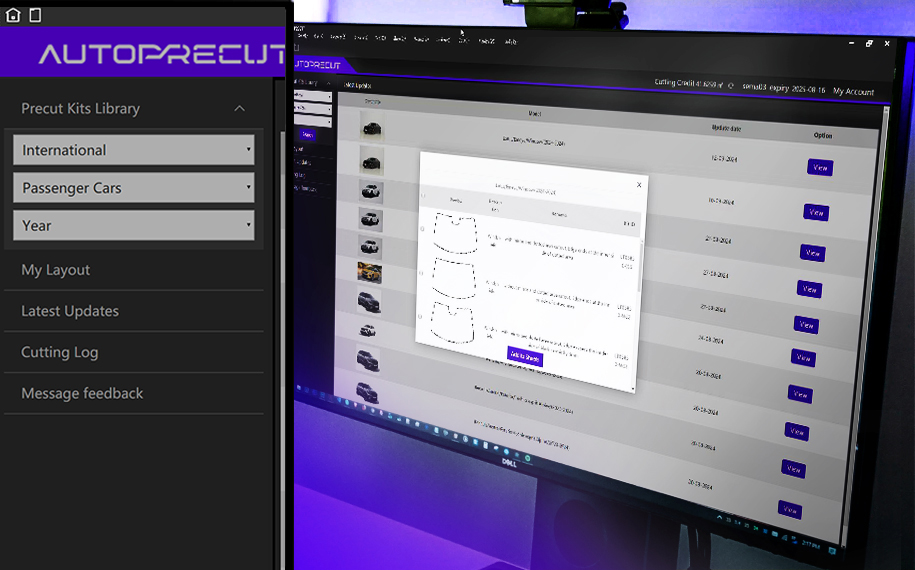
AutoPrecut features an extensive and diverse database primary focused on automotive industry, the database is continuous updated, encompassing not only the latest models but also numerous classic vehicles, ensuring it meets the need of various customers. Additionally, the database extends to the field of window tint and bicycle, offering precise cutting templates for these products. The software also includes a wealth of data on electronics devices such as phones, tablet PC, and watches, further broadening its application scope. This comprehensive database makes AutoPrecut a one-stop solution for film-cutting needs, catering to the professional requirements of multiple industries.
2. New User Interface
AutoPrecut introduces a newly designed user interface centered on enhancing user experience. The interface layout is clean and intuitive, enabling smoother operation. Whether for professional users or beginners, all can easily get started and quickly master the software's various functions. The new UI also integrates modern design elements, using a soft color scheme to reduce visual fatigue and improve comfort during extended periods of work.
3. Node Editing
Autoprecut node editing function allows users to precisely control the cutting path. Users can easily adjust the cutting path according to their specific needs by adding, deleting, or moving node s on the design, fine-tuning the cutting lines to ensure a perfect fit on a complex surfaces. This feature is particularly useful for cutting intricate patterns, providing users with greater flexibility and control, significantly enhancing work efficiency and cutting quality.
4. Multi-Language
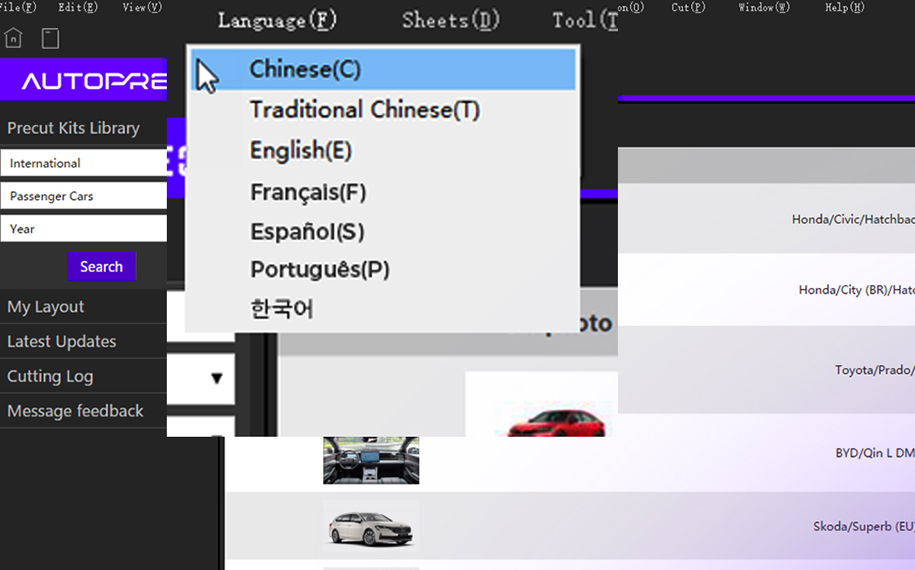
Autoprecut offers comprehensive multi-language support, with its interface translated into several major languages, including English, Chinese, French, Spanish, Portuguese and Korean. This ensures that the software meets the needs of users from different countries and regions. Users can easily switch languages without restarting the software. The multi-language feature not only makes the software more global but also facilitates smoother collaboration within international team.
5. Auto Nesting
Autoprecut auto nesting function is a key feature of its ability to increase production efficiency and reduce material waste. This function by using advanced algorithms, automatically calculate the optimal cutting layout while considering factors such as film material size, shape, and orientation. Users can set various parameters, such as minimum spacing and sheet size, to meet different production needs. These capabilities not only save significant time on manual layout but also markedly improve material utilization.
6. Enterprise Package
Autoprecut offers comprehensive OEM customization services to meet unique requirements of clients. Customization elements include interface layout, function modules, and database content. The software provides API interfaces, supporting integration with the existing system of clients. Users can customize color schemes and brand logos. The technical team is available to develop exclusive function modules or optimize specific workflows. The high degree of customization enables Autoprecut to adapt to various specialized application scenarios, making it an ideal solution for anything from small studios to large-scale production lines.
curriculum
无人机的开设课程
The data development process of AutoPrecut has been iterated from 2D to 3D. The advent of 3D scanning has enabled us to build a close cooperative relationship with more customers worldwide.
If you find that there is something wrong with our pattern, which caused losses to you. Please contact our after-sales team in time and we will make compensation for you.
The brand-new logo and UI create a refreshing and minimalist new style, which is more visually coordinated and unified. With a better visual feeling for the user, AutoPrecut provides a user-friendly experience.
You can export the layout with one click in AutoPrecut, which makes it easy for customers to find the corresponding pattern location and install it more easily and quickly.
qualifications
测试您是否符合报考条件
Why choose us
选择我们的四大理由
qualifications
培训案例
公安培训
应急管理局培训
消防培训
电力培训
curriculum
常见问题
1. Tips: Necessary preparations before cutting film.

  1. Set the maximum cuttable length.

  2. Extend cuttable width.

  3. Close the machine for panel cutting.

  4. Adjust print command.

  5. Set cutting speed.

  6. Adjust the exposed length of the knife tip.

  7. Set plotter pressure.

  8. Cutting test.


1. Why should I buy AutoPrecut? What can AutoPrecut do for my business? 

To help you grow your business and reduce costs, then improve work efficiency and customers' satisfaction, which makes you stand out from the competition. What’s more, it can attract more vehicle dealers for you.

2. Are all vehicles available on AutoPrecut? 

We have above 95% of the most common vehicles, and we are adding new ones every day.

3. Can I try out AutoPrecut before purchasing?

AutoPrecut provides a 15-day free trial period.


4. How to apply for a software trial?

Click “Contact Us” and submit the information, and we will contact you after the information is verified.


*Only for store owners and corporate customers in the industry, not for individual customers.


1. How to pay for AutoPrecut?

The Chinese version supports Alipay and the English version supports PayPal. If the customer doesn’t have any one of the options, then he/she can contact the sales to use the bank cards to pay.

2. Can you provide the invoice?

The invoice can be provided, you need to contact the sales to provide relevant information.

3. Is my credit card information secure on AutoPrecut software?

We won’t store your credit card information on our website database or server.


1. Can AutoPrecut be logged in more than one computer?

One account can only be logged in one computer. If you change the computer, you need to contact the customer service staff to unbind the account.

2. How to log in AutoPrecut if I forgot my password?

You can reset the password by clicking on “Forgot Password”, and link on the login page. You will receive an email sent to your registered address, allowing you to reset your password.

3. What are the system requirements for running AutoPrecut?

AutoPrecut doesn’t support IOS system currently, but only Windows system. It’s recommended to use Windows 64-bit system.


4. How do I deal with the network error when opening AutoPrecut?

If you encounter such a situation, you can restart your computer and open the software first. If it still reports an error, you can try to replace another network.


5. How to solve the problem that the plotter can’t start properly?

The plotter must be installed with a driver and connected to the computer by USB.


6. What should I do if the plotter displayed that it isn’t in the supported list?

If the plotter used by the customer isn’t in our supported list, we will arrange for the relevant engineers to conduct remote debugging.


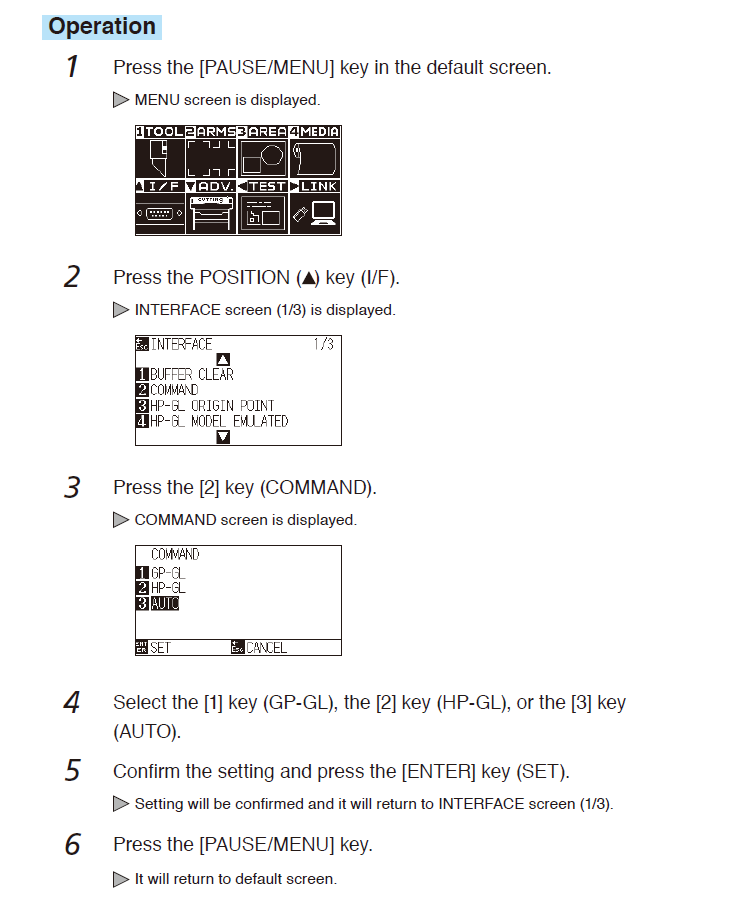
7. Why does the plotter display characters without patterns?

When the plotter prints a string of characters, COMMAND needs to be changed to AUTO.


The modification method is shown as follows:


2. More Questions?

If you can’t find the answer you need, our team is here to support by email as always, so please reach out.