




One account can only be logged in one computer. If you change the computer, you need to contact the customer service staff to unbind the account.
You can reset the password by clicking on “Forgot Password”, and link on the login page. You will receive an email sent to your registered address, allowing you to reset your password.
AutoPrecut doesn’t support IOS system currently, but only Windows system. It’s recommended to use Windows 64-bit system.
If you encounter such a situation, you can restart your computer and open the software first. If it still reports an error, you can try to replace another network.
The plotter must be installed with a driver and connected to the computer by USB.
If the plotter used by the customer isn’t in our supported list, we will arrange for the relevant engineers to conduct remote debugging.
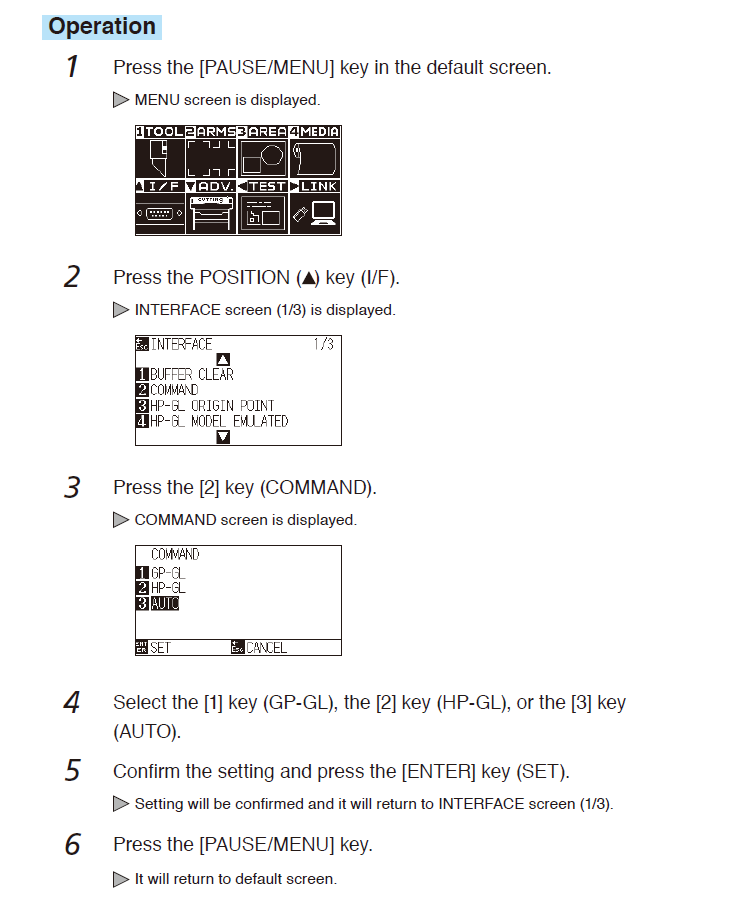
When the plotter prints a string of characters, COMMAND needs to be changed to AUTO.
The modification method is shown as follows:


 info@autocut-tech.com
 +852 59641557
 +86 0571 8780 1008
  Mon-Sat: 8:30AM - 5:30PM (UTC+8)

